
Below are some links and resources to help settling in to remote working.
Oxford University IT Learning Centre
A great place to start:
- Remote working: Resources to help you
- Centre for Teaching and Learning : Teaching Remotely
- Dedicated support for remote teaching is available by emailing remote@ctl.ox.ac.uk
They will be able to help with any queries related to delivering remote teaching.
- Dedicated support for remote teaching is available by emailing remote@ctl.ox.ac.uk
Microsoft Teams
- You do not need a TEAM to use Teams – Microsoft Teams – explaining the confusing naming convention
- Using Microsoft Teams for online Chat with individuals and groups
- Schedule a meeting with Microsoft Teams
- Record a Meeting in Microsoft Teams
- Microsoft Teams Tips and Tricks
Apple and Microsoft products – HE discounts
- Available to students and staff with University email account
- Higher Education discounts on Apple and Microsoft products – https://theEDUstore.co.uk
- Apple student discounts via their portal – UNiDAYS
Chorus Phones
- From the Chorus handset you can configure your number to be forwarded to your home or mobile number
- Learn more – Chorus Call Forwarding from 35G handset
- If you are away from your handset then it is possible to setup a forward remotely, however, the feature must be enabled on the extension by the Chorus team before you can use it.
- Learn more about remote activation call forwarding – Remote activation call forwarding (RACF)
Environment
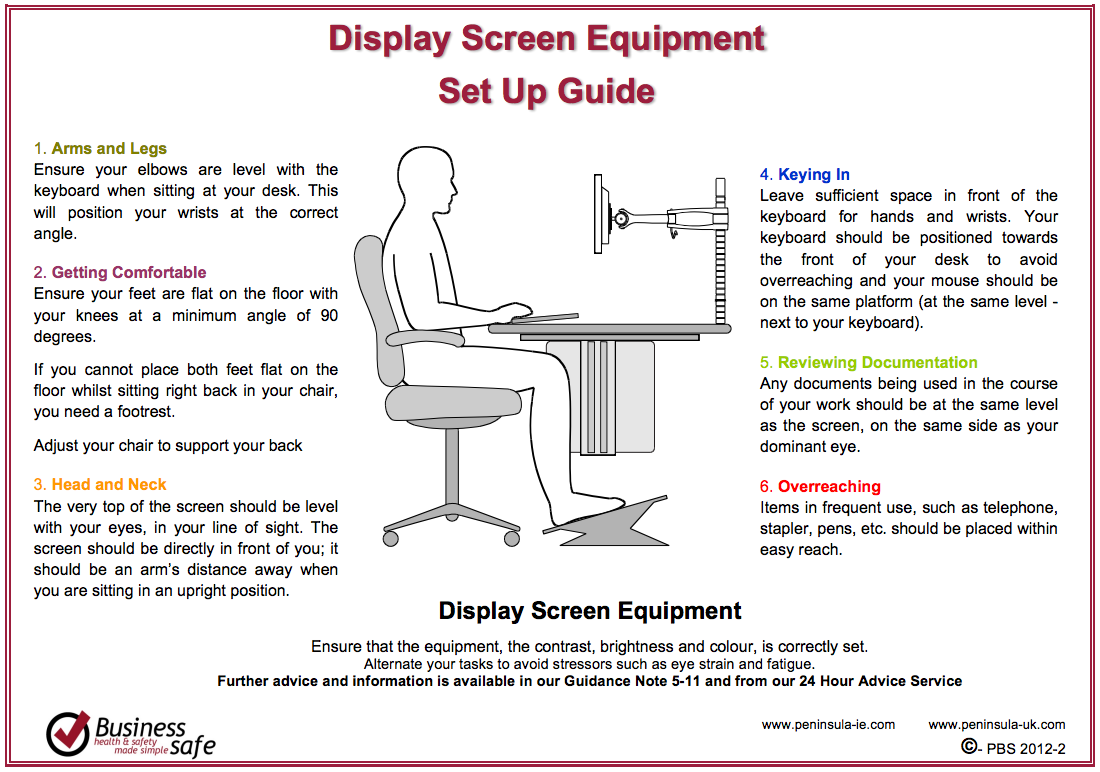
Are you sitting comfortably?
It is going to be difficult to get the correct sitting position when working from home on a borrowed laptop when you don’t have a dedicated space. Below is the ideal environment – but not everyone will have the luxury of a dedicated working study desk at home.
Practical Tips for Remote Working
Here are a few tips you can use to make remote working a little easier on yourself.
- Create a schedule and plan regular breaks
- Take regular breaks
- Try and use a separate full size keyboard and mouse rather than your laptop keyboard all the time
- Here are some suggestions for keyboards and mice on Amazon (other online retailers are available!)
- Raise the laptop screen – together with a separate keyboard and mouse – to reduce neck strain
- Cheap laptop raisers (not sure how long it will be available at this price)
- A selection of laptop raisers on Amazon
- Better still – if you have the space – invest in a separate monitor
- Take regular breaks
- Try some “at-the-desk” yoga! – https://www.youtube.com/watch?v=tAUf7aajBWE
- If you don’t have a dedicated home office workspace then try working in different locations.
- kitchen table (for research so you can spread books out)
- sitting on the sofa (for reading articles)
- out in the garden with printed worked – or just take a break
- Make a video call to a colleague who is also remote working
Other useful guides
- How to keep your Mental Health in check when you work from home
- Working from Home: A Guide to Creating a Healthy and Productive Workspace
- Remote Working & Mental Health: A Young Professional’s Guide
Foreign Travel
- Traveling Overseas and staying in contact – General IT guidance for anyone working overseas for an extended period of time.